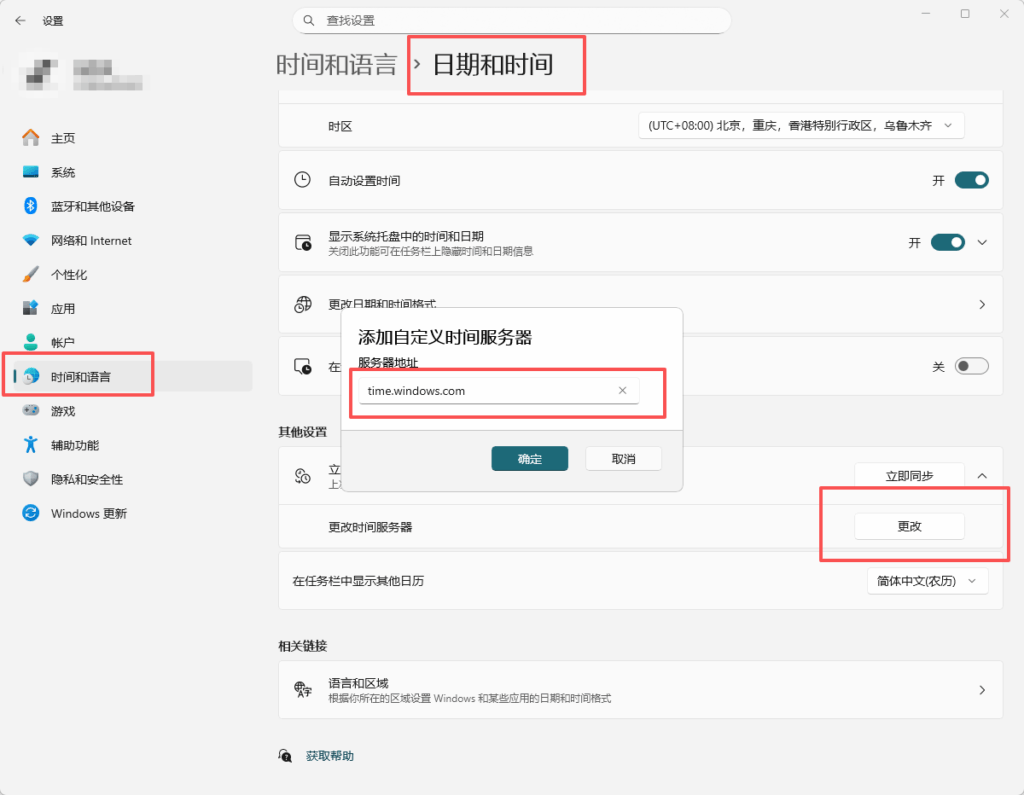
NTP地址
阿里云内网
ntp.cloud.aliyuncs.com
ntp7.cloud.aliyuncs.com
ntp8.cloud.aliyuncs.com
ntp9.cloud.aliyuncs.com
ntp10.cloud.aliyuncs.com
ntp11.cloud.aliyuncs.com
ntp12.cloud.aliyuncs.com
阿里云外网
ntp.aliyun.com
ntp1.aliyun.com
ntp2.aliyun.com
ntp3.aliyun.com
ntp4.aliyun.com
ntp5.aliyun.com
ntp6.aliyun.com
ntp7.aliyun.com
腾讯云内网
time1.tencentyun.com
time2.tencentyun.com
time3.tencentyun.com
time4.tencentyun.com
time5.tencentyun.com
腾讯云外网
ntp.tencent.com
ntp1.tencent.com
ntp2.tencent.com
ntp3.tencent.com
ntp4.tencent.com
ntp5.tencent.com
linux使用方案
以下默认是centos和ubuntu,默认是先centOS,后ubuntu
安装chronyc
sudo yum install chrony
##
sudo apt install chrony
修改配置文件
文件位于 /etc/chrony.conf 或者 /etc/chrony/chrony.conf,下面是配置文件示例(腾讯云内网方案):
# drift 文件用于记录之前时钟频率调整(单位是ppm)
driftfile /var/lib/chrony/drift

# chronyd 开启后的前三次时间调整,且时间差超过1.0秒才跳变调整时间
makestep 1.0 3

# 允许内核定期将系统时间同步到 RTC 时间
rtcsync

# TAI-UTC offset 和闰秒的信息
leapsectz right/UTC

# 日志输出到/var/log/chrony
logdir /var/log/chrony
# 打印每个 ntp 包的 rawmeasurements,一般在调试或问题排查时使用
log rawmeasurements
# 打印 tracking 日志,用来记录系统时钟的整体状态
log tracking

# (可选)监听 NTP 端口(默认是 udp 123),作为 NTP server 向其他机器提供 NTP 服务
# allow all

# 配置 NTP 服务器
server time1.tencentyun.com iburst
server time2.tencentyun.com iburst
server time3.tencentyun.com iburst
server time4.tencentyun.com iburst
server time5.tencentyun.com iburst
或者
# 配置信息,包含了 NTP 服务器地址,最小轮询间隔,最大轮询间隔等信息。
server ntp.cloud.aliyuncs.com minpoll 4 maxpoll 10 iburst
server ntp10.cloud.aliyuncs.com minpoll 4 maxpoll 10 iburst
server ntp11.cloud.aliyuncs.com minpoll 4 maxpoll 10 iburst
server ntp12.cloud.aliyuncs.com minpoll 4 maxpoll 10 iburst
server ntp7.cloud.aliyuncs.com minpoll 4 maxpoll 10 iburst
server ntp8.cloud.aliyuncs.com minpoll 4 maxpoll 10 iburst
server ntp9.cloud.aliyuncs.com minpoll 4 maxpoll 10 iburst
启动 chrony
sudo systemctl restart chronyd  # 重启 chronyd 服务
sudo systemctl enable chronyd   # 开机自动启动 chronyd

###

sudo systemctl restart chrony  # 重启 chrony 服务
sudo systemctl enable chrony   # 开机自动启动 chrony
检查 chrony 状态
systemctl status chronyd     # 查看 chronyd 服务状态,Active: active (running)表示正在运行
systemctl is-enabled chronyd # 查看 chronyd 是否开机自动启动,enabled 表示开机自动启动

###

systemctl status chrony     # 查看 chrony 服务状态,Active: active (running)表示正在运行
systemctl is-enabled chrony # 查看 chrony 是否开机自动启动,enabled 表示开机自动启动
其他命令
chronyd -Q # 向 NTP 服务器查询当前时间差,不修改系统时间

chronyc sources -v # 查看时钟源的状态,有时钟源被星号*标记表示已同步
chronyc tracking   # 查看系统时钟状态
关于chronyc的其他内容
chronyc sources -v 指标简要说明
M:对端类型,^表示 server。
S:*表示最优时钟源,+表示按统计方式(加权平均)合入系统时钟的调整,-表示未合入。
Name/IP Address:时钟源的域名/IP。
Stratum:表示时钟源的层级,正常取值1到15,16表示有异常。
Poll:log2轮询间隔,poll=4表示轮询间隔是24秒,即16秒。
Reach:表示近8个数据包的到达情况,八进制377表示近8个 ntp 包都没有丢。
LastRx:距离上一次收到通过校验的 ntp 包过了多久。单位一般为秒,具体以界面显示为准。
Last sample:用来衡量当前机器与时钟源的时间差,这里几个时间差是统计计算的中间结果。
chronyc tracking 指标简要说明
Reference ID:最优时钟源域名/IP。
Stratum:当前机器的层级。
Ref time:上次从时钟源计算指标的时间。
System time:非跳变调整的时间差。
Last offset:上一次时间差,正数表示本地时钟比服务器时钟快。
RMS offset:时间差的长期统计均值。
Frequency:表示如果 chrony 不调整时钟,系统时钟频率会差多少。
Residual freq:当前时钟频率与最优时钟源频率的差距。
Skew:频率误差界。
Root delay:到 stratum-1时钟源的 RTT(roud-time trip)。
Root dispersion:到 stratum-1时钟源的固有误差。
Update interval:两次时钟修正的间隔。
Leap status:闰秒状态。
至于Windows